Amplíe las capacidades de gestión de MediaMonkey.
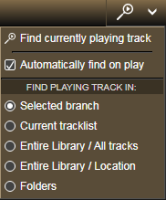
Permite buscar y visualizar automáticamente la carpeta que contiene la pista que se está reproduciendo actualmente dentro de la rama seleccionada del árbol de medios cada vez que el programa comienza a reproducir otra pista. Una vez que se encuentra la carpeta que la contiene, la pista que se está reproduciendo actualmente se seleccionará en la lista de pistas principal.
No se puede descargar directamente, el complemento se enviará por correo electrónico después de recibir la donación. La versión gratuita para MM4 está disponible para descargar en su sitio web.
Translated automatically (see original)It allows finding and displaying of the folder that contains the currently playing track within the selected branch of the Media Tree automatically whenever the program starts to play another track. After the containing folder is located, the currently playing track will be selected in the main tracklist.
There is no direct download, the add-on will be send by e-mail after received donation. The free version for MM4 is available for download at its web site.
Hide original
By
Zvezdan Dimitrijević
Presentado por ZvezdanD
Actualizado 20/06/2022
Historial de versiones / Detalles
- Versión:
- 2.0
- Actualizado:
- 20/06/2022
- Funciona con:
- Media Monkey 5
- Cambios:
Added: version of the add-on for MediaMonkey v5.
Este complemento resalta los archivos de baja tasa de bits en las listas de archivos.
Translated automatically (see original)This addon highlights low-bitrate files in file listings.
Hide original
By
Ventis Media, Inc
Presentado por drakinite
Actualizado 08/12/2020
Historial de versiones / Detalles
- Versión:
- 1.0
- Actualizado:
- 08/12/2020
- Size:
- 1.25 KB
- Funciona con:
- Media Monkey 5.0.0 - 5.0.0
Monitor de la lista principal
Top List Monitor convierte tu historial de escucha de MediaMonkey 5 en listas de clasificación dinámicas e interactivas ( Mejores álbumes , Mejores canciones y Mejores artistas ) con métricas detalladas para ayudarte a analizar y mejorar tus clasificaciones de manera eficiente.
Características y funcionalidades clave
3 vistas de clasificación dedicadas: Rastrea los elementos principales por recuentos de reproducciones acumulados (álbumes/artistas) o reproducciones de pistas individuales (canciones).
Lógica de clasificación inteligente: Utiliza la clasificación estándar de la competición (1-2-2-4) con un manejo justo de los empates (los elementos empatados nunca se omiten).
Métricas de escucha motivacional:
Para alcanzar el siguiente puesto/hito: muestra la cantidad exacta de partidas necesarias para alcanzar la siguiente posición, un múltiplo de 50 o el hito más alto (Top 100, Top 50, etc.).
Eficiencia y eficiencia temporal: Calcula los "puestos ganados en el ranking por reproducción" y los "puestos ganados por hora de escucha".
Indicadores de clientes potenciales y zonas de alto riesgo: resalta las brechas cercanas (zona de alto riesgo en amarillo) y visualiza los clientes potenciales de menor rango con alertas codificadas por colores (rojo/amarillo/verde).
Saturación y promedios: muestra cuán concentrados están tus hábitos de escucha (por ejemplo, % del total de reproducciones en tu Top 10/100).
Potente filtrado y navegación:
Filtra por género , año de lanzamiento o año de reproducción (por ejemplo, analiza los lanzamientos de la década de 1990 reproducidos en un año específico).
Haz clic en cualquier entrada para ir directamente a ese álbum, canción o artista en tu biblioteca de MediaMonkey.
Exportación de listas de reproducción con 1 clic: Exporta los $N$ álbumes, canciones o pistas más populares por artista como listas de reproducción estáticas agrupadas en una carpeta dedicada.
Totalmente personalizable: configure la longitud de las listas, los umbrales mínimos de reproducción y el tamaño de exportación de las listas de reproducción para cada categoría.
Top List Monitor
Top List Monitor turns your MediaMonkey 5 listening history into dynamic, interactive ranking lists (Top Albums, Top Songs, and Top Artists) with detailed metrics to help you analyze and boost your rankings efficiently.
Key Features & Functionality
Hide original
3 Dedicated Ranking Views: Tracks top items by cumulative play counts (Albums/Artists) or single track plays (Songs).
Smart Ranking Logic: Uses standard competition ranking (1-2-2-4) with fair tie handling (tied items are never omitted).
Motivational Listening Metrics:
To Next Rank / Milestone: Shows exact play counts needed to reach the next position, multiple of 50, or top milestone (Top 100, Top 50, etc.).
Efficiency & Time-Efficiency: Calculates "rank places gained per play" and "places gained per hour of listening time".
Lead & Hot Zone Indicators: Highlights close gaps (yellow "Hot Zone") and visualizes leads over lower ranks with color-coded alerts (Red/Yellow/Green).
Saturation & Averages: Displays how concentrated your listening habits are (e.g., % of total plays in your Top 10/100).
Powerful Filtering & Navigation:
Filter by Genre, Release Year, or Play Year (e.g., analyze 1990s releases played in a specific year).
Click any entry to jump directly to that album, track, or artist in your MediaMonkey library.
1-Click Playlist Export: Export Top $N$ albums, songs, or top tracks per artist as static playlists grouped in a dedicated folder.
Fully Customizable: Set individual list lengths, minimum play thresholds, and playlist export sizes per category.
By
AI (Inspired by Fetznschaedl)
Presentado por fetzenschaedl
Actualizado 25/10/2026
Historial de versiones / Detalles
- Versión:
- 0.32.3
- Actualizado:
- 25/10/2026
- Size:
- 318.66 KB
- Funciona con:
- Media Monkey 2024 - 2027
- Cambios:
Top List Monitor 0.32.3: changes since 0.28.0
New
- Right-click play menu (Play Now / Queue Next / Queue Last) in all four lists:
- Top Songs (0.28.0): clicked song, top N, N random
- Top Albums (0.29.0): clicked album, top album, random album
- Top Artists (0.30.0): artist songs by playcount or rating, top N / N random artists, random album; right-click on an unfolded album plays it complete
- Top Genres (0.31.0): genre songs by playcount or rating, random songs, random album
- Settings for the menu: master switch and one switch per list, Top N / Random N size (1-100), song scope (respect list filters or all songs), song limit (1-150)
- Settings panel with four tabs (General, Lists, Playlists, Play menu) in Tools > Addons > Configure and Tools > Top List Monitor > Settings (0.32.0)
- Native controls, range shown next to number fields, Defaults button; existing settings carry over
Fixed
- Album playlists (“Top N as Playlist” included) now follow disc and track order (0.29.0)
- Artists differing only in capitalization are treated as one artist (0.30.3)
- Right-click play menu (Play Now / Queue Next / Queue Last) in all four lists:
- Versión:
- 0.27.1
- Actualizado:
- 06/10/2026
- Size:
- 287.61 KB
- Funciona con:
- Media Monkey 2024 - 2027
- Cambios:
-
Better Light Skin Compatibility & Visual Polish:
-
Better support for light MediaMonkey themes, with automatically adapted background, text, and accent colors for optimal contrast.
-
Refined table presentation featuring dimmed zero/empty values, structured column groups, clear visual hierarchy, and integrated progress bars.
-
Custom-built dropdowns and theme-adaptive input controls replacing native browser selects.
-
-
Navigation & Filtering Enhancements:
-
Click-through navigation now opens tracks, albums, artists, and genres directly in your Entire Library rather than scoping to selected collections.
-
Top Genres now features full time-filtering support via Period (Plays), Year (Plays), and Year (Release) dropdowns.
-
A dedicated Reset button in all list windows restores default filters and reloads the view in a single click.
-
-
New Statistics & Metrics:
-
Added Median play count and Min to enter list thresholds to the top summary statistics bar across all views.
-
-
Performance & Usability:
-
Smooth background batch-rendering for large lists to minimize UI freezing during generation.
-
Refined keyboard behavior (e.g., pressing Escape dismisses open dropdowns first without closing the whole window).
-
- Flexible List Limits ("Limit Priority"): A new "Limits" dropdown across all lists gives you control over how thresholds are applied (Both limits, Fill to Max entries, or All ≥ Min plays). This prevents lists from becoming unexpectedly short when combining strict genre, period, or year filters with play counts.
-
- Versión:
- 0.9.2
- Actualizado:
- 21/09/2026
- Size:
- 246.28 KB
- Funciona con:
- Media Monkey 2024 - 2024
- Cambios:
New Features 0.9.2
-
HTML & Word Report Export (v0.9.0, v0.9.1)
-
Added a new Report (HTML / Word) feature across all four dialogs (Top Albums, Songs, Artists, Genres).
-
Generates print-ready reports respecting active filters and custom row limits ($1text{–}5000$).
-
Supports standalone HTML files for web browsers and Word .doc formats (styled with MediaMonkey-inspired formatting).
-
v0.9.1 updates: Improved Word/OpenOffice compatibility, landscape orientation support, dense multi-page layouts, and fixed-width rating columns to prevent clipping.
-
-
Expandable Artist Top Albums (v0.8.0, v0.8.1)
-
Added an arrow button in Top Artists allowing users to unfold an artist’s top albums directly in the list view without re-rendering or losing scroll position.
-
Displays album positions, play counts, total listening time, relative percentage share bars, and star ratings (filtered exclusively to the selected artist's track contributions).
-
Persistent selection stays expanded during sorts, searches, and refreshes.
-
-
Star Ratings for Albums & Songs (v0.7.0)
-
Introduced a Rating column for Top Albums and Top Songs, displaying ratings with 5-star half-precision (visualized using precise CSS gold/grey overlays).
-
Pulls native database ratings (Songs.Rating / Albums.Rating), supports sorting (unrated items placed last), and exports values into CSVs without impacting performance metrics.
-
Can be toggled on or off via Settings.
-
-
- Versión:
- 0.6
- Actualizado:
- 17/09/2026
- Size:
- 216.27 KB
- Funciona con:
- Media Monkey 2024 - 2024
- Cambios:
Features
-
Distinct Menu Icons (v0.6.0): Added unique toolbar icons for all menu entries (Top List Monitor, Top Albums, Top Songs, Top Artists, Top Genres) using built-in MediaMonkey 5 icons and a custom SVG (charts.svg).
-
Genre Filter "Contains" Mode (v0.5.9): Introduced a toggle chip (= Exact vs. ⊇ Contains) enabling substring search across genres, direct text filtering on Enter, active filter indicators in UI/filenames, and automatic filter re-application when toggling modes.
-
Performance Optimization for Top Songs & Artists (v0.5.6): Extended the RANK() window-function optimization to Top Songs and Top Artists, reducing queries from 2–3 full table scans down to a single query pass.
-
- Versión:
- 0.5
- Actualizado:
- 02/09/2026
- Size:
- 188.46 KB
- Funciona con:
- Media Monkey 2024 - 2024
- Cambios:
What’s New in v0.4.6 – v0.5.0
-
CSV Export (v0.5.0): Added an "Export as CSV" button to all lists (Albums, Songs, Artists, Genres). It exports whatever data is currently visible in the grid (respecting active filters/sorting) using UTF-8 with BOM for proper Excel compatibility.
-
"Rank by" Metric Switching (v0.4.7): You can now switch the ranking basis between Plays and Listening time for Albums, Songs, and Artists. Choosing "Listening time" recalculates all metrics (Rank, Rank gain, Hot Zone, Efficiency, etc.) based on estimated total listening time instead of pure play counts.
-
"Listening time" Column (v0.4.6): Introduced a dedicated column in Albums, Songs, and Artists lists showing estimated cumulative listening time ({plays} x {track length}).
-
- Versión:
- 0.4.5
- Actualizado:
- 29/08/2026
- Size:
- 167.62 KB
- Funciona con:
- Media Monkey 2024 - 2024
- Cambios:
? What's New in Version 0.4.5 ? Enhanced Rank Trend Analysis
-
Dynamic Period Support: Rank Trend now works dynamically with short-term Period filters (e.g., Last 7/30/90/180/365 days) by comparing current performance against the equivalent previous timeframe.
-
Year Trend Indicators: Track how entries move over time compared to their status at the start of the year, including gain/loss indicators, new entries, and a dedicated "Fell out of Top N" section.
-
Improved UI & Tooltips: Renamed to "Rank trend" with automatically updating headers, hints, and context tooltips.
⚙️ Unified Step Logic & Custom Thresholds
-
Flexible "Rank gain at +" Field: Replaced fixed dropdowns with a customizable input field (1–100) that defaults directly to your list’s Hot Zone threshold.
-
Consistent Calculations: Unified time efficiency (rank/h), rank gain, and efficiency metrics to share the exact same step size across all calculations.
?️ Bug Fixes & Performance
-
Promise Handling Fix: Fixed an issue where dialogs would get stuck on "Loading..." when trend data was fetched.
-
Accurate Filtering & Headers: Fixed bugs where minimum play requirements were bypassed for baseline rankings and where custom "Max entries" limits were ignored in tooltips.
-
- Versión:
- 0.3.1
- Actualizado:
- 21/08/2026
- Size:
- 141.31 KB
- Funciona con:
- Media Monkey 2024 - 2024
- Cambios:
v.01.1 - v0.3.1
-
New Top Genres List: Added to Tools → Top List Monitor → Top Genres, showing total plays, library share, and distinct counts for songs, artists, and albums per genre (with multi-genre track support). Configurable via Settings.
-
Performance & UI Fixes: Optimized Top Genres loading on large libraries via SQL pre-grouping, and added a visual gap between columns and scrollbars across all list windows.
-
Configurable Hot Zones & Rank Gain Expansion: Hot zone thresholds are now individually adjustable per list (defaulting to 2 for Songs, 10 for Albums/Artists). Expanded "Rank gain at" dropdown options up to +50, and added an explanatory hover tooltip to the Efficiency header.
-
Header & Footer Quick Controls: Added session-overriding header inputs for "Max entries" and "Min plays" with custom stepper controls, alongside an inline playlist entry count field in list footers for live updates.
-
Playlist & Filtering Improvements: Standardized playlist naming patterns to encode active filters, switched playlist export dates to ISO 8601 format ([YYYY-MM-DD]), and introduced a "Period (Plays)" filter (7 to 365 days / All time).
-
System & Code Maintenance: Added optional keyboard hotkeys for main lists, expanded the Settings dialog layout, and consolidated shared dialog helper logic internally.
-
- Versión:
- 0.1
- Actualizado:
- 18/08/2026
- Size:
- 106.62 KB
- Funciona con:
- Media Monkey 2024 - 2024
Dependiendo de su fuente, es posible que tenga cientos de archivos en un audiolibro de varios CD.
Cada CD tiene sus propios números de pista, lo que significa que puedes terminar con varias pistas con nombres idénticos en todo el álbum.
Una pesadilla para algunos reproductores de audio a la hora de mostrar el orden correcto.
Track Entitler simplemente ofrece la posibilidad de nombrar automáticamente las pistas en función del número de pista.
Proceso
- Asegúrese de que todos los archivos tengan números de pista en orden secuencial correcto.
- Seleccione todas las pistas a las que desea cambiarle el título.
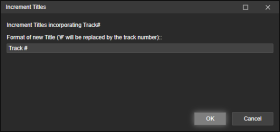
- Haga clic con el botón derecho en Editar etiquetas (o utilice Herramientas > Editar etiquetas ) y seleccione Incrementar títulos .
- Añade el texto que quieres que tengan las pistas con nuevos títulos.
El carácter # será reemplazado por el número de pista.
Ejemplos
Pista #
Pista 1
Pista 2
Pista 3
...
Luna Nueva # de 102
Luna Nueva 1 de 102
Luna Nueva 2 de 102
Luna Nueva 3 de 102
...
Depending on your source - you may have hundreds of files in an audiobook from several CDs.
Each CD its own track numbers, which means you may end up with several identically named tracks in the entire album.
A nightmare for some audio players to gifure out the correct order.Track Entitler merely offers the possiblilty to automatically name the tracks based on the track number.
Process
- Make sure all files have Track Numbers in correct, sequential order.
- Select all tracks you want re-entitled.
- Right-click Edit Tags (or use the Tools > Edit Tags), and select Increment Titles.
- Add the text that you want your newly entitled tracks to have.
The character # will be replaced by the track number.Examples
Track #
Track 1
Track 2
Track 3
...
New Moon # of 102
New Moon 1 of 102
Hide original
New Moon 2 of 102
New Moon 3 of 102
...
By
ConcernedWife
Presentado por ConcernedWife
Actualizado 08/10/2025
Historial de versiones / Detalles
- Versión:
- 1.0.2
- Actualizado:
- 08/10/2025
- Size:
- 2.41 KB
- Funciona con:
- Media Monkey 5 - 5
- Cambios:
Initial version